











The Throne Bet application gives Tanzanian users a mobile platform for sports betting and account management. Compared with using a browser, an installed app can make repeat access more convenient and keep the main interface ready on the device. This guide explains how to download the Android APK, install it safely, check for updates, use the service on an iPhone, and troubleshoot common technical issues.
The mobile platform is intended for supported devices with an active internet connection. Betting, account balances, odds, deposits, and withdrawals depend on communication with the service, so the app should not be treated as an offline tool. Before installing any file, confirm that it comes from the official Throne Bet website and that your phone has enough free space.
Why Use the Throne Bet App
A dedicated application can feel quicker than a mobile website because some interface elements are stored locally. Opening the app also avoids typing the website address each time. The exact speed depends on the phone, network, and current server load, but a stable connection remains necessary for loading markets and placing bets.
The touch-focused layout is useful on a smaller screen. Menus, sports categories, live events, account details, and bet history can be reached without keeping several browser tabs open. If notifications are supported and enabled on your device, they may provide updates about account activity or selected events. Check the notification settings rather than assuming every alert is active by default.
The app can also make routine account tasks easier. Users may be able to review settled and pending bets, check a balance, make a deposit, request a withdrawal, or view transaction records from the account area. Payment availability and processing times depend on the method and the account, so review the relevant instructions before confirming a transaction.
How to Download the App
For Android users, an APK is the installation package used to add an application outside the Google Play Store. If the official website provides an APK, use that source rather than relying on search results, unofficial app stores, or file-sharing pages.
Open the website in your phone browser and look for the mobile application area or an Android download control. Read the page carefully before tapping a file. A legitimate download should be presented in the context of the official service, not as a random attachment or a shortened third-party link.
The mobile website is an alternative when you do not want to install an APK. It needs no installation and uses little permanent storage, although it may not offer the same notification or shortcut behaviour as an installed application. It is also useful when an Android phone does not meet the app's requirements.
Android APK Installation
Android may block an APK until permission is granted to the browser or file manager that opened it. The wording differs between Android versions, and the permission can normally be withdrawn after installation.
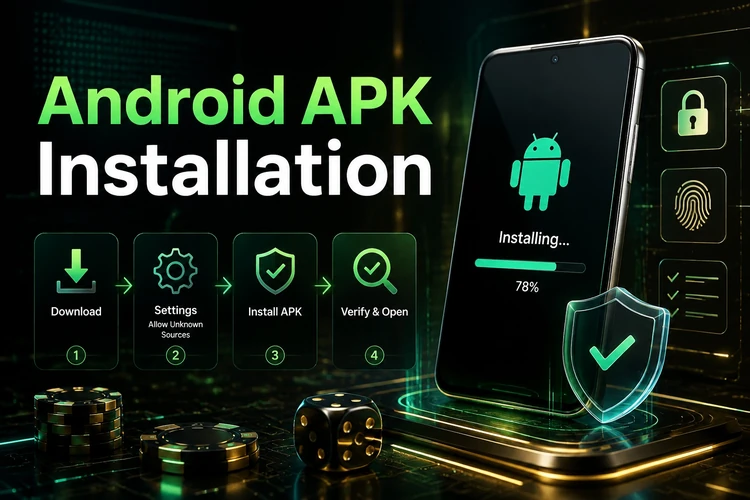
- Step 1: Open the official Throne Bet website in your mobile browser and select the Android download option if one is provided.
- Step 2: Wait for the download to finish and check that the file came from the expected website before opening it.
- Step 3: Open Settings and find Security or Privacy. On newer phones, select the browser or file manager under Install unknown apps.
- Step 4: Allow that specific source to install the file. Avoid leaving the permission enabled for unrelated applications.
- Step 5: Open the APK from the Downloads folder or the download notification and review the installation prompt.
- Step 6: Complete the installation, then launch the app from the home screen or application list.
- Step 7: Log in to your account with your existing details. New users should follow the service's registration process before attempting to place a bet.
If the installation finishes successfully, you can return to Settings and disable permission for unknown sources. Never install a replacement file simply because a pop-up claims that an urgent update is required. Delete suspicious downloads and obtain a fresh file from the official source.
Latest APK Version
Application updates can correct faults, improve compatibility, or change parts of the interface. Do not rely on an invented version number: check the official website or an in-app notice for the current release available to your device.
When an update is offered, confirm that the phone has sufficient storage and a reliable connection. A new APK is usually installed over the existing application, but account data should not be assumed to be permanently preserved. Make sure you know your login details before updating, and avoid interrupting the process.
An older version may stop working after changes to the service. If the app repeatedly requests an update, using the mobile website temporarily is safer than downloading an old file from an archive. Do not use an APK obtained from an unknown source just because it carries a newer-looking label.
Throne Bet App for iPhone
The draft information indicates that there is no standalone Throne Bet app currently distributed through the Apple App Store. iPhone users can therefore use the mobile website in Safari or another supported browser, subject to the service's availability and current features.
For quicker access, open the website in Safari, tap the share control, and choose Add to Home Screen. This creates a home-screen shortcut that opens the site in a browser view. It is not the same as a native iOS application, and browser permissions for notifications or saved sessions may differ from those on Android.
No jailbreak or unofficial installation profile is needed for this approach. If a page asks you to install an unknown configuration profile or an unverified file, close it and return to the official website. The mobile website remains the practical fallback when an Android APK cannot be installed.
Main Features
The mobile platform can provide access to pre-match and live sports markets. Live odds and event information change while a match is in progress, so review the market, price, and settlement conditions immediately before confirming a bet. A temporary connection delay can make the displayed information differ from the current market.
Account tools may include balance checks, deposits, withdrawal requests, transaction records, and bet history. Payment methods, minimum amounts, verification checks, and processing times can vary. Read the instructions shown for your account and do not assume that a deposit and withdrawal have identical processing times.
A bonus area may display available offers and their conditions. Wagering requirements, expiry dates, eligible markets, and maximum restrictions should be checked before opting in. Notifications, where available, can be managed through device and application settings, while settled and pending wagers can be reviewed in the account menu.
Device Compatibility
Compatibility depends on the Android release, device security settings, available storage, and the version supplied by the service. Rather than relying on a fixed memory or file-size claim, check the requirements shown on the download page and keep additional space available for temporary installation files and updates.
A stable Wi-Fi or mobile-data connection is needed to load odds, authenticate the account, and submit bets. Mobile data can be affected by signal strength and network congestion. If pages load slowly, switch between Wi-Fi and mobile data, close background downloads, and try again before reinstalling the app.
Older phones with limited memory may struggle when many live events are open. Closing unused applications, restarting the device, and keeping the operating system current can improve basic performance. The app cannot place bets offline because prices and confirmations must be received from the service.
Common Problems and Solutions
If the APK will not install, check the download source, available storage, and permission for the browser that opened the file. A damaged or incomplete download should be deleted and downloaded again from the official website. Do not bypass a security warning without first checking why it appeared.
If the app crashes or remains on a loading screen, restart the phone and clear the app cache if that option is available. Check the connection and install any official update. Reinstall only after confirming that you remember your account credentials and that any locally stored information is not needed.
Login failures can result from incorrect details, a poor connection, or a temporary service issue. Enter the credentials carefully, use the password recovery option if necessary, and avoid repeated attempts if the account becomes temporarily restricted. If the problem continues, use the site's support channel rather than downloading another application.
A compatibility message usually means that the device or operating system does not meet the current requirements. Update the phone where possible. If it cannot run the app, use the mobile website instead. For payment or account verification problems, keep any relevant transaction reference and contact support through the official service.
Comparison: App vs Mobile Website
| Feature | App | Mobile Website |
|---|---|---|
| Access | Requires installation | Opens in a browser |
| Storage | Uses application and cache space | Uses browser cache |
| Notifications | May support device notifications | Depends on browser permissions |
| Updates | May require a new APK | Updates on the service side |
| Connection | Required for betting and live data | Required for all online functions |
| Offline betting | Not available | Not available |
The app may suit frequent users who want a home-screen shortcut and, where supported, notifications. The mobile website is more suitable for occasional use, limited storage, or an incompatible device. In both cases, check the market and confirmation details before submitting a bet.
Frequently Asked Questions
The application file itself is free to download when supplied through the official website. You still need to consider mobile-data charges, and deposits or bets involve money. Review the account and betting terms before using the service.
Open the official Throne Bet website on an Android phone and use the Android download option shown there. Check the source before opening the file, and do not use third-party download pages.
The safest option is the APK provided through the official Throne Bet website. Avoid modified or repackaged files, check Android's security warnings, and remove installation permission for unknown sources after setup if you prefer.
The available information indicates that there is no standalone iPhone app in the Apple App Store. Use the mobile website in Safari instead, and add it to the home screen if you want a quicker shortcut.
Check the official website or an in-app notice for an available release. Confirm that you have enough storage, download the current APK, and install it over the existing application. Keep your login details available in case the session ends.
An account is required for betting, deposits, withdrawals, and most account functions. Existing users can log in with their credentials. New users should complete the service's registration and any requested verification before funding the account.